
More like this
 New Tanuki Sunset
  Works on phone Adventure Drivers
  Cars Simulator
  Works on phone Drift Boss
  Madalin Stunt Cars 2
  Works on phone Monster Tracks
  Works on phone X-Trial Racing
  Works on phone Drive Mad
  Works on phone Eggy Car
  New Works on phone HexGL
  Exclusive Works on phone ArrowGo 3D
  New Works on phone BitLife
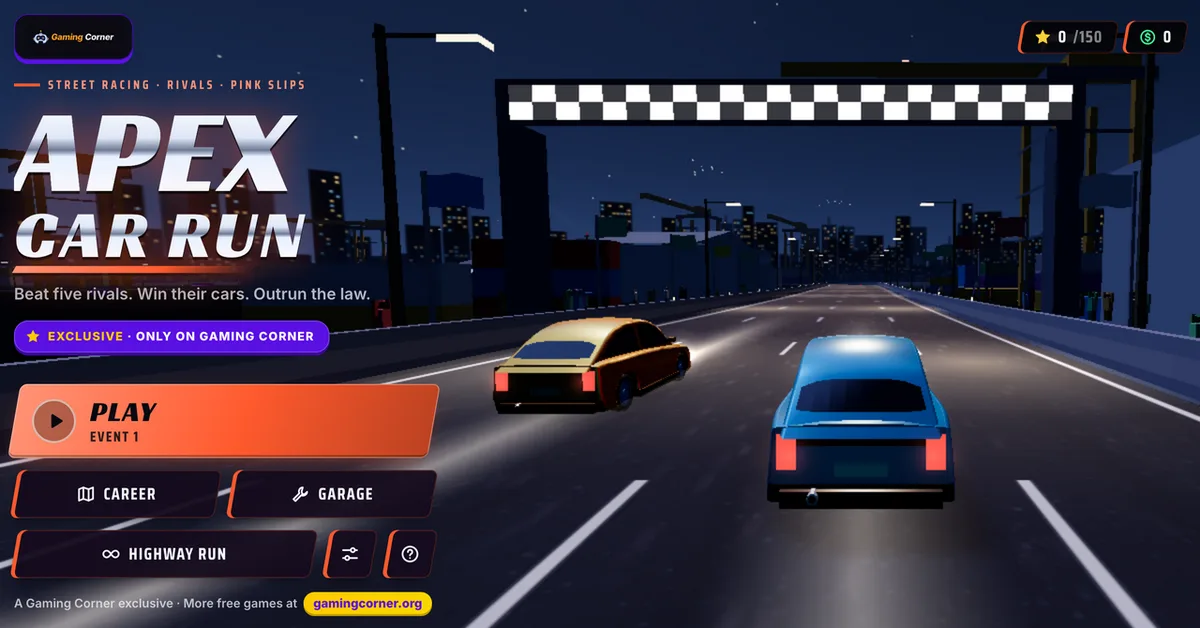
 Apex Car Run: Play the Free 3D Street Racer Online
Apex Car Run is a 3D arcade street racer from Gaming Corner. You race through a harbor at night, a sunset coast, a red canyon, a mountain pass and a neon downtown. You beat rival drivers, win their cars, tune your own and try to lose the police. It runs in your browser, it is free and it needs no download.
The game has 50 events in five regions, 11 cars, a garage for parts and paint, and an endless mode called Highway Run. It saves your progress in the browser, so you can close the tab and come back later.
Free • No download • 50 events in 5 regions • 11 cars • Keyboard, gamepad and touch
What Is Apex Car Run?
Apex Car Run is an original racing game that Gaming Corner made, and you can only play it here. It follows the classic street racing recipe. You have rivals to beat, cars to tune, pink slips to win, police who chase you, and nitrous that you earn by driving close to the edge.
The cars are arcade cars. They grip hard, they slide when you pull the handbrake and they get back up to speed fast. The starter car reaches 100 km/h in about 4.5 seconds. The 11 cars in the game are fictional, so none of them match a real model.
Five regions, ten events each
The campaign has five regions, and each one is a different place to drive: Harbor Nights, Sunset Coast, Red Canyon, Alpine Pass and Neon Downtown. Tracks come in six styles. Harbor roads have sweeping searchlights and red beacons. Crowds with camera flashes stand at the start line and at some corners.
Speed that you can see
The camera pulls in closer and lower as you speed up, and the field of view widens. Speed lines show up past half of your top speed. Lamps and reflector posts flash by the road edge. Smashable props fly when you hit them, and wall scrapes leave a trail of sparks.
The speed meter rises in one sweep from 0 to top speed. The engine sound rises with it in one line, with no gear shifts. The sound is soft on purpose, and you can turn off sound and music in Settings.
How to Play Apex Car Run
Each event follows the same loop. Here is what happens from the title screen to the next event.
1. Pick an event on the Career map
Press Play or Career on the title screen. The event screen shows the type, the rule (for example, finish in the top 3), the length, the laps, the police heat, the payout and a recommended car rating. If your car rating is below the recommended one, visit the Garage first.
2. Race
Event types are circuit, sprint, knockout, speed trap, checkpoint run and police outrun. Event 10 of every region is a duel against that region's rival. Your position, the minimap and the speed meter stay on screen. A pill appears when you chain near misses or hold a drift.
3. Collect cash and stars
The result screen shows your place, your time, your best lap and up to three stars. It lists the cash you earned line by line. Replay an event if you want a better result.
4. Win a pink slip
Beat a rival in the duel for the first time and you win their car. The game tells you on the result screen with a Pink slip card. Then you can drive that car in the next events.
Apex Car Run Controls
The game supports keyboard, gamepad and touch. Press the help button on the title screen, or Show controls help in Settings, to see this list in the game.
Keyboard
W or the up arrow is gas. S or the down arrow brakes and reverses. A and D or the left and right arrows steer. Space is the handbrake for drifts. Shift or N burns nitrous. C changes the camera, R resets the car and P or Esc pauses.
Touch
Two steering pads sit under your left thumb. Under your right thumb are BRAKE, NITRO and DRIFT. Auto accelerate is a setting for touch play. When it is on, the gas stays down and the game slows the car for corners unless you hold BRAKE. Turn it off and a GAS button appears.
Gamepad
Steer with the left stick. RT is gas and LT is brake and reverse. A is nitrous, X and B are the handbrake, Y changes the camera and Start pauses.
Garage, Cars and Highway Run
The Garage has two tabs, Performance and Style. Spend your race cash there.
Performance parts
Each car has four performance parts, and each part has three levels. The event screen compares your car rating with a recommended rating. Upgrade parts before a hard event, not after you lose it.
Paint and style
You can change paint, finish, rims, underglow, livery and spoiler. A showroom view shows the car as you change it.
Highway Run
Highway Run is an endless run on a 40 km highway. The game keeps your best distance. Use it when you want a short run with no event rules.
Police Heat, Drifting and Nitrous Tips
Some events add police. Heat is a level from 0 to 5. Police use roadblocks, spikes and a helicopter. A BUSTED meter fills while they have you. If it fills, you lose the race and can restart it.
- Hold nitrous on straights. Drifting, drafting and near misses refill it.
- Brake before a tight corner, then use the handbrake to slide through it. Drifts keep much of your speed.
- Check the car rating on the event screen. Buy parts before you race an event with a higher recommended rating.
- On touch, auto accelerate lifts the gas for corners. Hold BRAKE yourself when you want full control.
- Change to the Far camera if the Chase camera hides the road. The Hood camera is the closest view.
- Use Auto graphics first. If the game stutters, set Graphics to Medium or Low.
Why Play Apex Car Run in Your Browser?
The game loads in a browser tab. There is no launcher and no account. It uses three.js for the 3D view, so it needs a browser with WebGL. The graphics setting has Auto, High, Medium and Low, so older laptops and phones can run it too. In menus and in hidden tabs, the game stops drawing frames.
If you want more cars after this one, see all of our free racing games. Drift Boss is a one button drift game. HexGL is a futuristic 3D racer. Tanuki Sunset is an arcade longboard drift game. Browse all game categories for other genres.
Open the page, press Play and take the first event in Harbor Nights. Fifty events are waiting.
Frequently Asked Questions
Is Apex Car Run free to play?
Yes. Apex Car Run is free on Gaming Corner. It has no download, no sign up and no payment. Cash from races pays for car parts and paint, and you earn that cash by driving.
Can I play Apex Car Run without downloading anything?
Yes. The game runs in your browser. Open the page, press Play and the title screen loads. Nothing installs on your device.
Does Apex Car Run work on mobile?
Yes. On a phone or tablet you steer with two pads under your left thumb. BRAKE, NITRO and DRIFT buttons sit under your right thumb. Auto accelerate is on by default for touch, and it slows the car for corners.
Do I need an account, and does the game save my progress?
You do not need an account. The game saves your cars, cash, stars and race progress in your browser. If you reload in the middle of a race, it resumes at the last lap line or sector gate. Clearing your site data erases the save.
How do you play Apex Car Run?
Pick an event on the Career map and read its rule, such as finishing in the top 3. Then race. Press W or the up arrow for gas, steer with A and D or the arrow keys, brake with S, and use Space to drift. Win cash and stars, then spend the cash in the Garage.
How do I drift and use nitrous in Apex Car Run?
Hold Space (DRIFT on touch) to slide through a corner. Press Shift or N (NITRO on touch) to burn nitrous. Drifting, drafting behind other cars and near misses refill the nitrous meter, so use it on straights.
How many events, regions and cars are in Apex Car Run?
There are 50 events in 5 regions: Harbor Nights, Sunset Coast, Red Canyon, Alpine Pass and Neon Downtown. The game has 11 cars. Highway Run is a separate endless mode that tracks your best distance.
Can I play Apex Car Run with a gamepad?
Yes. Use the left stick to steer, RT for gas, LT to brake, A for nitrous, X or B for the handbrake, Y to change the camera and Start to pause. Keyboard and touch work too.