


Arrow Puzzle: Play ArrowGo 3D Online
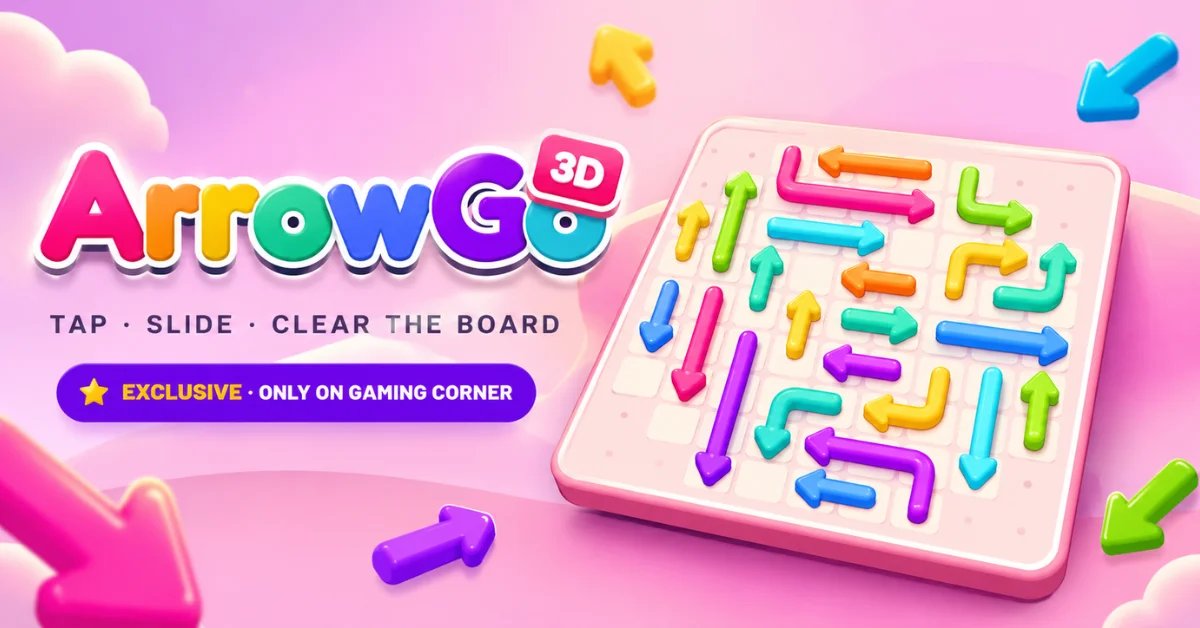
Looking for an arrow puzzle game that is more than simply tapping arrows off a flat board? ArrowGo 3D is a 3D arrow puzzle game from Gaming Corner where you tap, slide and clear the board by working out the right order of moves. The idea is simple: look at where an arrow points, find its way out and clear the board without wasting your hearts.
As levels become more challenging, you need to think ahead instead of tapping randomly. ArrowGo 3D is free to play online on Gaming Corner and is available exclusively there. It combines arrow puzzle, arrow escape and slide puzzle mechanics with a 3D board, multiple camera views, 10 worlds and 100 levels.
Free • No download • No sign up • 100 levels across 10 worlds • Works in any modern browser on desktop and mobile
What Is ArrowGo 3D?
ArrowGo 3D is a 3D arrow puzzle game built around one simple objective, clear the board by moving arrows in the correct order. Each arrow points toward its way out. The challenge is figuring out which arrow can move first and which arrows need to be cleared before others can escape. That makes ArrowGo 3D more than a basic arrow slide puzzle.
You have to read the board, understand the direction of each arrow and make moves that open the next route. The game includes 10 worlds and 100 levels giving you a structured progression rather than a single collection of random arrow puzzles.
A 3D Take on the Arrow Puzzle
The 3D presentation adds another layer to the usual arrow puzzle format. Instead of looking at everything from only one fixed perspective you can use different camera views to understand the board. You can switch between Tilt and Top camera options depending on which view makes the current puzzle easier to read.
How to Play This Arrow Puzzle Game?
ArrowGo 3D uses a simple control system but solving the harder boards requires careful planning.
1. Check Where the Arrow Points
Start by looking at the arrowhead. Its direction tells you where the arrow needs to go. Do not immediately tap the first arrow you see. Check whether its route is actually clear.
2. Tap the Right Arrow
When an arrow has a usable path, tap it. The arrow slides in the direction it points. The important part is choosing the right order. One move can open a route for another arrow while a careless move can cost you a heart.
3. Slide and Clear the Board
Continue removing arrows and opening new routes. Think of each move as part of a chain: Tap → Slide → Open Space → Find the Next Move.
4. Keep Clearing Until the Board Is Empty
The level is complete when you successfully clear the board. If you run out of hearts you can retry the level and approach the puzzle with a different move order.
How to Solve Arrow Puzzle Levels?
The easiest way to solve an arrow puzzle is not to tap quickly. It is to read the board before making each important move.
Look for the Safest Move First
Find an arrow that appears to have the clearest route out. Starting with a safe move can expose areas of the board that were previously difficult to read.
Check the Full Path
Do not judge an arrow only by what is directly in front of it. Look along the direction it points and consider what could prevent that move from working. This becomes especially important on crowded 3D boards.
Find the Blocker
If an arrow cannot move, ask: which arrow is preventing its route from opening? That blocker may need to be moved first. Solving the dependency between arrows is one of the main skills behind an arrow escape puzzle.
Plan One or Two Moves Ahead
You do not always need to solve the entire board before moving. Instead, identify a safe move, consider what space it will create and then reassess the board. This keeps the puzzle manageable while still giving you a strategy.
Learn From Mistakes
Mistakes are useful when you use them to understand the board. If a move does not work, remember which route was blocked and look for the arrow that needs to move first.
ArrowGo 3D Features
ArrowGo 3D combines the basic idea behind an arrow puzzle game online with features designed specifically around its 3D gameplay.
10 Worlds and 100 Levels
The game has 10 worlds and 100 levels, giving you a clear progression from one puzzle to the next. You can choose levels rather than being limited to a single continuous run.
Combo System
ArrowGo 3D includes a combo system that rewards successful sequences. As you clear arrows effectively, combos such as Combo ×3 can appear during gameplay.
Hearts and Mistakes
You have a limited number of hearts while playing. This makes move selection important. Instead of tapping every arrow to see what happens you are encouraged to examine the direction and route first.
Time and Mistake Tracking
Completed levels show your completion time and number of mistakes. That gives you another reason to replay levels after learning the correct solution. You can try to solve the same puzzle more cleanly and efficiently.
Random Levels and Replay
You can choose a level or use the random level option for a different challenge. Completed levels can also be replayed so finishing a puzzle does not have to be the end of it.
Tilt and Top Camera Views
The camera can be changed between Tilt and Top views. A top view can make the overall layout easier to understand while the tilted view can provide a stronger sense of the 3D board.
Colour and Mono Arrows
Arrow display can be switched between Colour and Mono. This gives you a visual option depending on which presentation you find easier to follow.
Sound, Music and Reduced Motion
ArrowGo 3D also includes settings for sound and music along with a Reduced Motion option. These settings let you adjust the presentation while playing.
Arrow Puzzle Tips and Strategy
Whether you call it an arrow puzzle, arrow escape or arrow slide puzzle game the same basic principle matters: the order of your moves is the puzzle. Use these habits when a level becomes difficult:
- Do not rush the first move. Spend a moment reading the board.
- Follow the arrow direction. Every move starts with understanding where the arrow is pointing.
- Look for an open route. A move is valuable when it also creates space for another arrow.
- Clear blockers first. If an important arrow is trapped, find what is stopping its route.
- Use the camera intelligently. Switch between Tilt and Top when the 3D layout becomes difficult to read.
- Protect your hearts. Avoid repeated guesses when you can inspect the board first.
- Replay difficult levels. Once you know the solution, try to reduce mistakes and improve your completion time.
Why Is ArrowGo 3D Different From a Regular Arrow Puzzle?
Many arrow games free to play online are built around a simple flat board. ArrowGo 3D keeps the familiar idea of arrows escaping in their direction but presents the puzzle as a 3D experience. The difference becomes most noticeable when the board gets crowded. You need to think about direction, available space, move order and the way the board changes after every successful move.
The camera options also let you inspect the puzzle from different perspectives. With 10 worlds and 100 levels, plus replay, random levels, combos, hearts, mistake tracking and time tracking the game has more progression than a single short arrow escape puzzle game. Most importantly, ArrowGo 3D is an original Gaming Corner game, rather than a copy of another arrow puzzle title.
Can You Play ArrowGo 3D Online for Free?
Yes. ArrowGo 3D is available to play online on Gaming Corner. If you are searching for arrow puzzle games online, arrow puzzle game free, arrow puzzle game free play or free arrow puzzle games online, you can play ArrowGo 3D directly through its Gaming Corner game page, and it sits alongside the rest of our free puzzle games.
It fits the broader category of online arrow games but its actual gameplay is specifically built around a 3D arrow puzzle experience. You do not need to treat it as a mobile only arrow game. The game is designed to be played directly through Gaming Corner.
Play ArrowGo 3D Online
If you enjoy arrow puzzle games, arrow escape games or arrow slide puzzle games, ArrowGo 3D gives the concept a 3D twist with 100 levels across 10 worlds. The controls are easy to understand but the harder boards reward patience, observation and planning. Open ArrowGo 3D on Gaming Corner, choose a level and start clearing the board.
Frequently Asked Questions
What is an arrow puzzle?
An arrow puzzle is a logic game where arrows must be moved, cleared or escaped in the correct order. The main challenge is usually understanding each arrow's direction and working out which move should happen first. ArrowGo 3D uses this concept in a 3D environment.
How do you play an arrow puzzle game?
Start by checking where each arrow points and whether its route is clear. Make a safe move, see how the board changes and continue clearing arrows until the board is empty. In ArrowGo 3D the basic flow is tap, slide and clear the board.
How do you solve an arrow puzzle?
Look for arrows with the clearest routes first. If an arrow is blocked, identify which other arrow is preventing its path and work on that dependency. The goal is not to make the most moves quickly. It is to find a move order that gradually opens the board.
Is ArrowGo 3D an arrow escape game?
Yes. ArrowGo 3D uses the same broad idea associated with arrow escape and arrow puzzle escape games, arrows need to find their way out and the player must work out the correct order. Its main difference is the 3D presentation and gameplay structure.
Is ArrowGo 3D a slide arrow puzzle?
Yes. Sliding is part of the core gameplay. You tap an arrow and it moves in the direction it points, making ArrowGo 3D a 3D take on the arrow slide puzzle genre.
How many levels does ArrowGo 3D have?
ArrowGo 3D has 100 levels across 10 worlds. You can select levels and replay them after completing them.
Can I play ArrowGo 3D online?
Yes. ArrowGo 3D is available directly on Gaming Corner as an online browser game.
Is ArrowGo 3D free to play?
Yes. ArrowGo 3D is available as a free online game on Gaming Corner.
What happens if I make too many mistakes?
The game uses a hearts system. If you run out of hearts you can retry the level and attempt a better move sequence.
Can I replay ArrowGo 3D levels?
Yes. Levels can be replayed, which is useful if you want to reduce mistakes, improve your completion time or simply solve a puzzle again.
What is the best strategy for a difficult arrow puzzle?
Do not start by tapping randomly. First scan the board, identify arrows with open routes and determine which blocked arrows depend on other moves. In ArrowGo 3D, changing the camera between Tilt and Top can also help when the 3D layout is difficult to understand.