


Bloxorz: Play Online Free (No Download, 33 Levels)
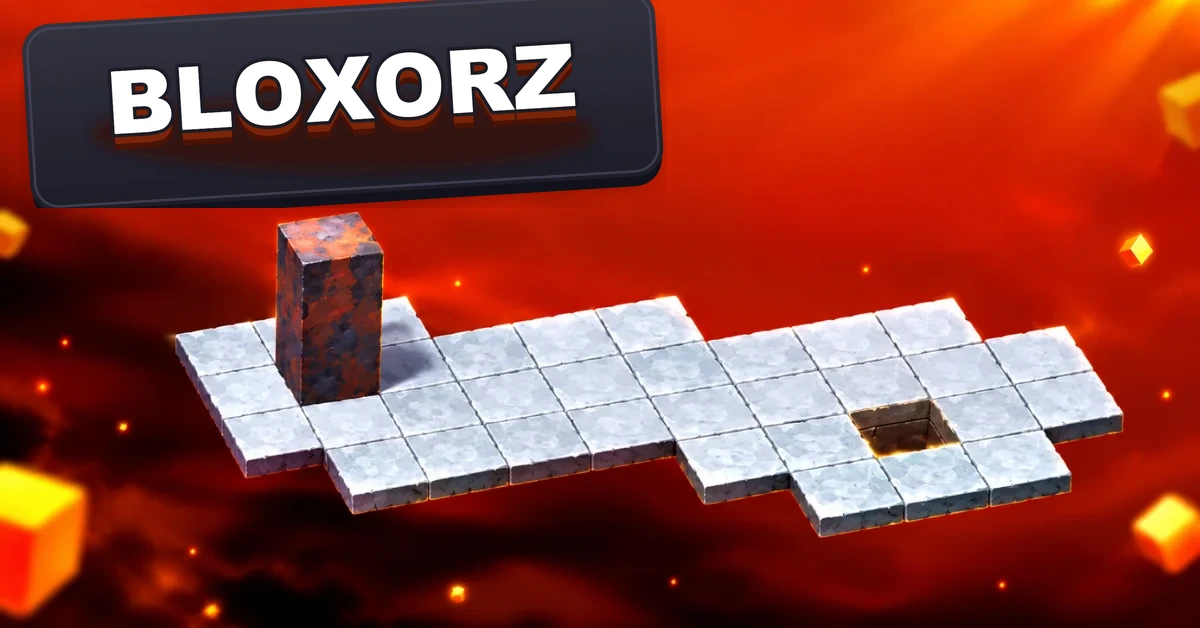
Bloxorz is a puzzle game where you roll a rectangular block across a floating grid, trying to drop it standing upright into a square hole. That's the entire premise, and it hasn't needed anything more since Damien Clarke of DX Interactive released it in 2007. There are 33 levels, no timer and no luck involved - every fall is your fault and every solution is findable if you think one move ahead.
If you've played it before, you already know why it's stuck around this long. If you're new, the short version is: press play above, roll the block with your arrow keys, and don't rush the first few levels - they're teaching you things you'll need by level 10.
Free • No download • No sign up • Works on Chromebook and school devices (keyboard required - see the mobile section below) • Goal: get the block standing upright into the square hole at the end of each level
How to Play Bloxorz
- Arrow keys roll the block one tile edge at a time: up, down, left, right.
- The block is twice as long as it is wide, so it's either lying flat (covering two tiles) or standing upright (covering one).
- If any part of the block goes off the edge, the level restarts immediately. There's no partial credit.
- Each level shows a six-digit passcode in the top right corner. Write it down so you can jump back without replaying earlier levels.
- The goal hole only accepts the block standing upright. Rolling over it while lying flat does nothing.
Switches and Tiles You'll Run Into
Later levels stop being pure movement puzzles and start testing whether you understand what each tile does. There are three switch types, and most guides only explain two of them.
Soft switches (circles)
These trigger no matter how the block touches them - flat, upright, it doesn't matter. They're the forgiving ones.
Hard switches (X shapes)
These only trigger when the block is standing upright directly on top of them. Roll over one flat and nothing happens, which is the single most common reason a bridge you're expecting to open stays closed.
Teleport switches (bracket and parenthesis shapes)
The one almost nobody mentions. Landing upright on one splits your block into two smaller 1x1 cubes and teleports them to a different part of the level. You then move each cube separately - the space bar switches which one you're controlling - and you have to get both of them back together, or both into separate holes, depending on the level. The first time this happens it feels like a bug. It isn't.
Orange tiles
These are fragile. Roll across them flat and you're fine. Stand the block upright on one and it breaks, dropping you and restarting the level. They show up starting around level 4.
Stuck on a Level? Here's What's Actually Going Wrong
Most players hit a wall around levels 7, 9 and 12 - not because those levels are unfair, but because each one introduces a specific habit you haven't built yet.
You keep falling on a level with a narrow path
You're probably trying to solve it in the orientation you're currently in, instead of planning the orientation you need to be in three moves from now. Before you move, look at the tile the block needs to land on next and work out whether it needs to arrive flat or upright. Then work backward from there.
A switch doesn't seem to do anything
Check whether it's an X-shaped (hard) switch. Those need the block standing upright directly on top, not just touching it. This is the most common "the game is broken" moment in Bloxorz.
You fall through a tile you swear was solid a second ago
You likely stood the block upright on an orange tile. Orange tiles hold weight when the block is flat and lying across them, not when it's balanced on one end.
You're repeating the same failed path over and over
That's a real, documented pattern: players get anchored to the first route they tried and keep retrying variations of it instead of stepping back. Try approaching the hole from a completely different direction before assuming the level is unsolvable.
None of this requires memorizing a move-by-move solution. Once you understand which tiles care about orientation and which don't, most levels stop feeling like guesswork.
Can You Play Bloxorz on Mobile?
Not the version above, and it's worth saying plainly instead of pretending otherwise. This is a Ruffle-emulated port of the original Flash game and it was built around arrow key input, so there's no touch control layer. It plays best on a desktop, laptop or Chromebook with a physical keyboard.
If you're specifically looking for a touch-friendly version, there are separate mobile apps (unofficial ports, not this game) built for phones, but they're different products with their own level designs, not the original 33-stage game.
Level Passcodes
Rather than publish a complete 33-code list - the sources we checked disagree with each other on at least one early code - here's what's reliably documented, plus the better habit. The game displays your current level's passcode in the top right corner every time you play it. Write down each one as you go and you'll never need to look one up.
| Level | Passcode |
|---|---|
| 1 | 780464 |
| 2 | 290299 |
| 3 | 918660 |
| 4 | 520967 |
| 5 | 028431 |
| 7 | 189493 |
| 8 | 499707 |
| 9 | 074355 |
| 10 | 300590 |
Level 6's code varies between the sources we checked, so if it doesn't work, the safest fix is just to capture it yourself the first time you reach it in game.
More Free Puzzle Games on Gaming Corner
If you want another clean logic puzzle once level 33 is done, our puzzle games section holds the rest of the collection, including 2048 for number stacking, Sliding Puzzle for classic tile order, Mini Putt for a slower kind of problem solving and Candy Crush for something brighter. Everything in our game categories is free and opens straight in the browser.
Frequently Asked Questions
How many levels does Bloxorz have?
33. They get progressively harder, with new mechanics such as switches, splitting and teleporting introduced roughly every few stages rather than all at once.
Is Bloxorz free to play?
Yes. The game above runs directly in your browser with no download, no account and no payment.
What are the controls for Bloxorz?
Arrow keys only - up, down, left and right roll the block, and the space bar switches between the two smaller blocks after a split.
Why does my block keep falling through the floor?
You're almost always standing upright on a tile that only supports the block lying flat, usually an orange (fragile) tile or a spot near the edge where only half the block's footprint is actually supported.
Is there a Bloxorz 2?
There are games marketed under that name on various sites, but they're not an official sequel from the original creator. Treat them as separate titles with their own level sets rather than a continuation of this one.